

Very early this morning, something came to me would have long before occurred to many of you. originalgreen.org warehouses thousands of image files, and Joe says it's fine to use the same folder structure on BSH so I don't break any links on the blog and other pages. I had visions of rebuilding all this for weeks on BSH, but what occurred to me this morning was "why not download entire folders with the subfolder structure and images intact from the cPanel of the host I'm leaving soon?" So I tried it, and can't download folders directly, but I can zip them and download the zip file! Weeks saved!
Here's the question: There are over a thousand image files in the blog, but there are also 613 .html files. Some of the early ones are in the appropriate post folder with the images; others are elsewhere. My gut feel is to upload just the images and their folders and let the project file put everything else where it wants it when first published. Is this best practice, or something else?
I got katrinacottages.co up recently, then decided to do the same with mouzon.com, which is an equally simple site. When following the BSH video on Cloudflare integration, it never occurred to me that something in the DNS settings would break all the mouzon.com email addresses.
Looking for a light-touch solution, I ran across iCloud+, which lets you bring in your own domains. But when trying to get the email up this morning, I was on with support people for several hours when a senior support person said "Apple doesn't do email hosting; we're providing a clean channel for getting your email from whoever your mail host is." This was after running the iCloud+ wizard that changed several of my DNS records on Cloudflare. So as of right now, I'm out of business until I can get our mouzon.com addresses up and running again.
katrinacottages.co has the cleanest DNS as it's right out of the can from Joe's Cloudflare Integration video, except for a record or two that might have come from the previous site builder years ago. A records katrinacottages.co and *.katrinacottages.co point to my server's IP address. MX records for those two point to mx.katrinacottages.co CNAME record www.katrinacottages.co points to katrinacottages.co and the other CNAME points to cur.dkim.v.eigmail.net, and may have been around since the first version of the site. Finally, there's a TXT record that points to text including "websitewelcome.com" and which likely came from the earlier site. One final question: on BSH-friendly DNS: Cloudflare uses these two nameservers: zariyah.ns.cloudflare.com and damian.ns.cloudflare.com Is there anything here that would break mail?
Mouzon.com is the domain with broken email, and unlike katrinacottages.co with 7 records, mouzon.com has 15. Fortunately I got a screen shot of the iCloud+ window before clicking Authorize, so I know the 5 that iCloud+ added and the 2 it deleted. I suppose I could put it back the way it was, but not sure what damage I'd be doing. One weird thing: some of the A records point to 68.66.200.206. One is autoconfig.mouzon.com, another is a subdomain I'm getting rid of, and the third is webmail.mouzon.com. My suspicion and vague recollection is that this address might have something to do with email (beyond webmail) so I hate to mess with this.
If you were in this mess, how would you start fixing it? The mouzon.com email broke yesterday, shortly after doing Cloudflare Integration on the site. And katrinacottages.co has no email accounts, so I have nothing to compare it with there.
As for mail hosts, I'm considering these three: 1. leave email hosting on hosting.com for the time being, where it has been for years, 2. Fastmail, which was recommended here, but which has no phone support, and I have questions about their pricing, such as whether the "user" in Business Pricing means a person with several email addresses or whether "user" refers to email addresses. That could get expensive really quick. 3. My registrar is Network Solutions and I called for DNS reasons before learning they do web hosting as well. The agent, whose first language definitely wasn't English, was trying to upsell me the whole time and it took quite a while to finish the call. Not a good look & feel.
Thoughts? All help greatly appreciated! Hoping to get back in business soon!
I'm back!! As it turns out, what originally broke mail was Cloudflare defaulting to orange cloud (proxied) on mail-related settings. I compounded the problem by trying to go to iCloud+, not knowing what caused the original break.
I'm working on a detailed step-by-step account of moving mouzon.com to BSH on my Useful Stuff (https://usefulstuffmouzon.tumblr.com) blog and will include this. It'll be a lot shorter than the Brooklyn Beach Design migration guide because I'm not doing higher-level stuff like Git deployment; I'm referring to the post as a "simple man's guide to moving to BetterSiteHost."
FWIW, I started Useful Stuff years ago as "notes to self" because with most things I do, I may not do again for months or years. For example, by the time I get around to migrating the rest of my sites in coming months, I'll definitely need reminders about the details even though they're much simpler than originalgreen.org. But if I need to know, maybe others do as well, so it's "notes to self in an open forum."
Wow, thanks so much for this, Joe! Working on it momentarily!
I'm building a replacement for another site built by my previous site-builder app, and realized I forgot to click the "Also add www version of the Domain" before creating the application. so I went back to the application and down to Application Domains at the bottom of the page and clicked Add a Domain button, which let me add www.mouzon.com to mouzon.com.
That got me wondering: is it that easy to create a subdomain? Like images.mouzon.com, for example? I realize I'd have to do Cloudflare integration to manage DNS, but I'd be doing that anyway. I don't need subdomains right now, but it would be great if they're that easy when the need arises.
Good to know, Joe... thanks! And yes, I'm planning to move over to Total CMS 3 as soon as everything else is up and running smoothly.

That is a pretty common workflow actually. You can create a subdomain that is purely used to house images, etc. However, I know that you are going to be using Total CMS 3. So I am not sure how useful that would be since you get so many features built into Total CMS 3 with images.
Thanks for all the guidance from everyone, especially Joe! I have a few thoughts:
Joe, I misunderstood you on the Path. Yes, it ends in /public_html but there are other things in between. And I didn't need to do anything about Public Key Authentication or Passphrase.
I got one error message on the first publish for having two index files, one .html and the other .php. I published a couple more times with minor text changes and index.html never showed up again... must've been a default setting somewhere, but not on my project file, where I'd already set Default Extension to php.
Deleting index.html required getting into the site on BSH, and I first tried Transmit, but everything it showed on the site was just gobbledygook. So I tried ForkLift, and it was plain English, so I licensed it and got rid of Transmit. The two windows with Dropbox (where I store all my images locally) on the left and the site on the right should make for a really easy workflow.
I have an oddity that existed on my sites on the previous web host: on both the KC site I'm putting up now and the OG site (the big one) I'll be putting up soon, there's a paged named "resources." I don't know if this is a cPanel issue or a RW issue, but on the previous host's cPanel, it has the first resources folder handling all the resources sub-pages, then a resources folder inside with a folder structure inside matching the pages and sub-pages in which the images are warehoused. So the images for the Agrarian Urbanism page on the OG site, for example, are in public_html/resources/resources/initiatives/agrarian-urbanism. I'd love to keep this identical structure in BSH so I don't have to rebuild countless links to the images. I've already tried adding a resources folder inside the resources folder RW published for the page and its sub-pages, and there was no error message so I'm thinking that should work just fine.
Thoughts?
Thanks, Joe! And Forklift is insanely simple. Not only can I put my Dropbox account (where my images and other components are BUT NOT my project files, which are on iCloud as noted earlier) in one screen and my application on BSH in the other and move stuff back and forth, but I discovered that I can drag files from the Finder into my application as well, and they copy almost instantaneously, whereas my previous host's cPanel took at least an order of magnitude longer.
If you want to keep that structure, then keep that structure. You are manually maintaining that resources folder it seems so you can have it organized however you like. I think doing it via Forklift is the easiest way. But you can use the file manager online as well.
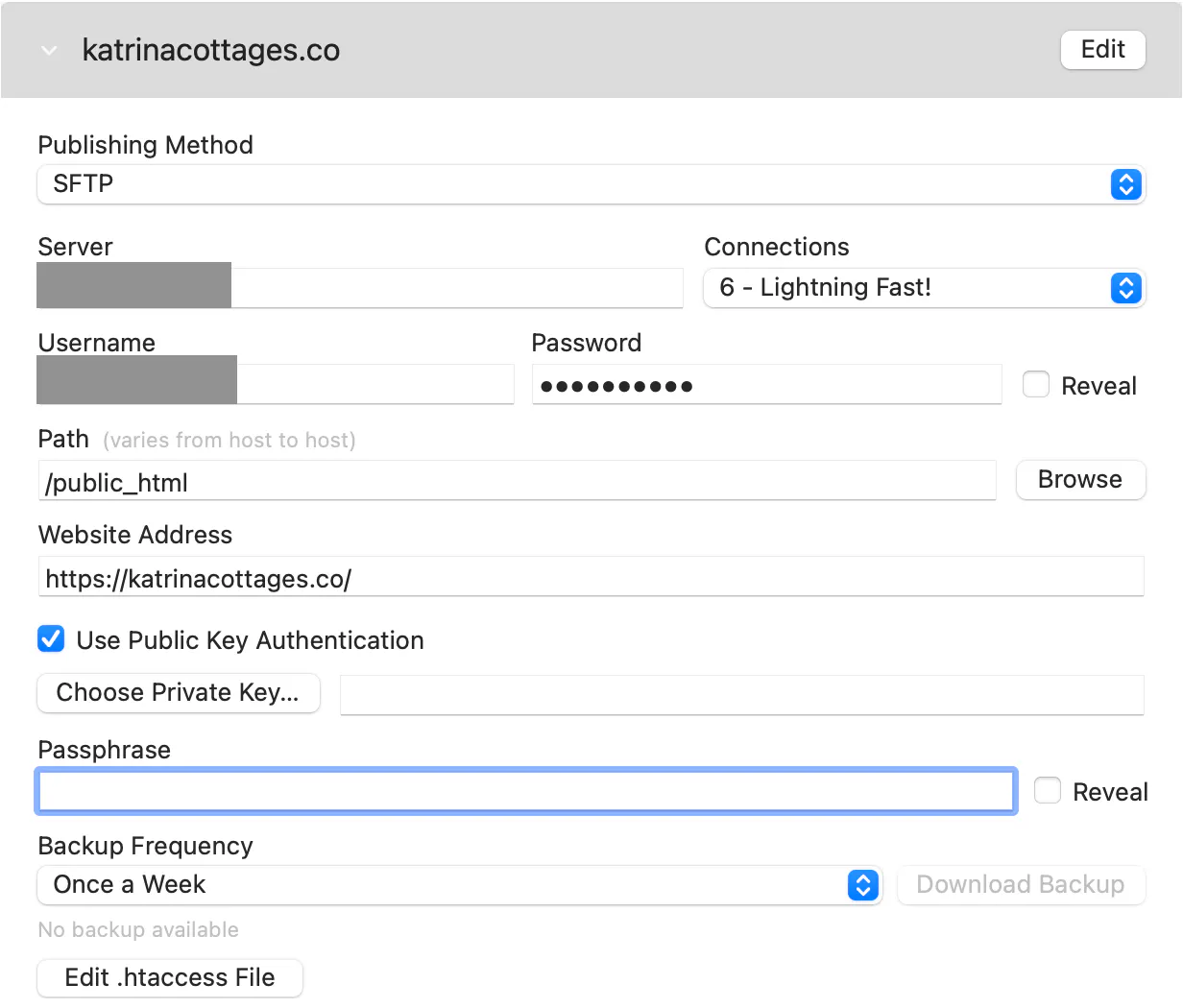
I'm getting closer to getting this simple site published on BSH, and have narrowed the problem down to just a few things. First of all, I can get on my server using Transmit and the credentials in the Publishing panel in my project file, so that's good, but it doesn't show the application yet... maybe because publishing failed too soon to create it. Here are two places where the trouble might lie:
The site was built in 2017 with my previous site-builder and is hosted on my previous web host. Do I need to take that site down before asking BSH to put up a site with the identical URL? I think I understood Joe to say that I could have both sites up until confirming that the new one is exactly right, toggling back and forth between servers/sites via the Cloudflare integration, but I could have misunderstood that. I've spent the past couple days rebuilding the site in RW, and didn't want to touch the old site until I got everything on the new site. The new site is integrated on Cloudflare, with the A records pointed to the IP address of my BSH server, but the strange thing is that Cloudflare is showing analytics from the old site... I guess it's based on the URL, not the server address.
I could also have setup problems. I'm satisfied that everything down through Website Address is fine (the Path is /public_html, right?) What's below is what's in question. I've tried it with Use Public Key Authentication checked and unchecked, but not knowing what my Private Key is or where to find it, I don't expect that to work when checked. The Passphrase is a mystery as well. The originalgreen.org Publish panel has none of these items, so I have no pattern to follow; it was first published from RW in 2020. Finally, the .htaccess file is currently empty, as I don't need to make pretty URLs because this site has no blog; it's just pages with text and pictures.
Also, I have been moving your posts to the BetterSiteHost space... https://community.weavers.space/bettersitehost
That path is not correct. This is why I told you in your last post to use the Browse button to determine the location you need to publish to.
Your 33% discount gets automatically applied upon checkout.
This week, we have an exciting Deal of the Week: Share It 3! Now available for just $16.72 (...
Last night I dropped the Total CMS 3.5.0 release candidate version onto the community. This means that the feature set for this HUGE release is locked in. Today I will be reviewing the latest 2 big ...
I added new multi-language property support into Total CMS 3.5. It will allow you to easily manage many different language content for your websites. The translations are still up to you (or AI) but ...
I have been hard on the new version of Total CMS: Site Builder. Extensions. CLI. One-command Composer install. This is the biggest T3 release I've ever shipped.
The new Site Builder lets T3 power ...
I've been working on Columnist 3 for the last few weeks and it's finally ready to show off. In today's live stream, I will walk through all the new features.
Columnist 3 is basically a newspaper style ...
Everything seems to move at 200mph this year! I have been working so hard on Total CMS that it feels like I just blinked and realized that it's been too long since I have gone live.
If you did not ...
Add the MCP server to your AI of choice and talk with all the videos on Stacks Guru!!!
I was playing around with it and it told me some pretty great and funny info! 🤣
Check out Foundation at https://www.weavers.space/stacks/foundation
Check out Points at https://www.weavers.space/stacks/points